Phon: 01731173992 | Email: contact@jakariacoder.com
How to Build a Stunning WordPress Website Step by Step-2026

How to Build a WordPress Website: Complete WordPress Development Tutorial
In today’s digital world, having a website is no longer optional; it’s essential. Whether you are a freelancer, business owner, blogger, founder, CEO, or developer, WordPress is one of the most powerful tools you can use to build your online presence. He makes what is difficult easy. This complete WordPress development tutorial will help you learn how to build a WordPress website, customize it, and launch a professional website from scratch. You do not need to be a coding expert with WordPress; everything can be done easily using themes, plugins, and smart customization. Let’s begin your journey to becoming a professional WordPress developer.
 What is WordPress?
 What is WordPress?
WordPress is an open-source Content Management System (CMS) used to build complete websites, e-commerce/WooCommerce, and blogs. It powers over 43% of all websites worldwide, making it the most popular website platform on Earth.
You can use WordPress to create:
- Personal blogs or portfolio sites
- Business and agency websites
- E-Commerce stores (with WooCommerce)
- Learning platforms or membership sites
- News and magazine portals
The best thing about WordPress is its flexibility. You can start simple and later scale it into a powerful online business.
Setting Up WordPress Website (Step-by-Step Guide)
Before you start developing, you need to set up your WordPress environment. Follow this step-by-step WordPress website setup guide to get started.
1. Choose Domain & Hosting for WordPress
Select a reputable hosting company, such as Hostinger or Namecheap. Next, pick a domain (for example, yourname.com).
2. Install WordPress CMS
The majority of hosting companies allow you to install WordPress with just one click. You can access your dashboard at YourDomainName.com/wp-admin after installation.
3. Select a WordPress Theme
The appearance of your website is controlled by themes. You can choose a premium theme from ThemeForest or a free one from WordPress.org.
4. Install WordPress Plugins
Plugins extend your site’s functionality. For example:
- Yoast SEO – SEO optimization
- Elementor—Drag-and-drop design (Pro and Free)
- WPForms – Contact form
- WooCommerce – Online store (Easy setup)
5. Customize Your WordPress Website
Go to Appearance → Customize to edit colors, fonts, logos, and layouts. Learn more in our internal guide: How to Customize WordPress Theme.
Understanding WordPress Structure (Core of Building a WordPress Website)
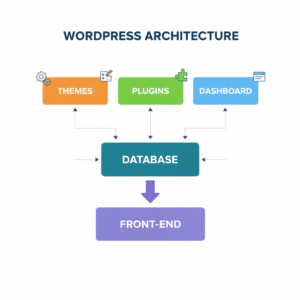
- Dashboard: The control center for your site.
- Themes: Define design and layout.
- Plugins: Add extra functionality.
- Posts & Pages: Core content types.
- Media Library: Stores all your images, videos, and files.
- Database: Stores your website data dynamically.
Once you understand these core parts, you can build anything with WordPress. 😍
Building a Custom WordPress Theme
A custom theme helps your website stand out and perform better. Here’s how to build a WordPress website with your own theme:
Basic Steps:
- Create a new folder inside
/wp-content/themes/. - Add
style.cssandindex.phpfiles. - Include files like
header.php,footer.php, andfunctions.php. - Enqueue styles and scripts using
wp_enqueue_style()andwp_enqueue_script(). - Use template tags like
get_header(),get_footer(),the_content(). - Test responsiveness and speed.
Pro Tip: Use a starter theme like Underscores, Astra, or GeneratePress for faster setup.
Plugin Development in WordPress
Plugins are the “apps” of WordPress. Here’s how to build a WordPress plugin easily:
<?php
/*
Plugin Name: My Custom Plugin
Description: Adds a simple message below each post
*/
add_action('the_content', 'add_custom_message');
function add_custom_message($content) {
  return $content . '<p>Thank you for reading!</p>';
}
?>
That’s your first simple WordPress plugin!
SEO & Optimization Best Practices for WordPress
To make your WordPress website rank globally, follow these optimization steps.
SEO Tips:
- Install Rank Math or Yoast SEO for better optimization.
- Use focus keywords like “how to build a WordPress website” in your title, URL, and meta description.
- Optimize images using TinyPNG.
- Create an XML sitemap and submit it to Google Search Console.
Speed Optimization:
- Use caching plugins like W3 Total Cache.
- Minify CSS and JavaScript files.
- Use a CDN for faster loading.
WordPress Security & Maintenance
- Keep everything updated.
- Use security plugins like Wordfence.
- Backup with UpdraftPlus.
- Enable SSL (https).
Launching & Growing Your WordPress Website
- Test all pages and forms.
- Check site speed using Google PageSpeed.
- Set up Analytics and Search Console.
- Promote via social media and SEO.
- Read our next guide: How to Promote a New WordPress Website
Conclusion Start Building Your WordPress Website Today
WordPress isn’t just a tool; it’s a complete ecosystem. With the right knowledge and creativity, you can build globally optimized websites that reach audiences anywhere in the world. Now it’s your turn to start building, customizing, and launching your first global WordPress website today!